
Innovation Monitoring ◉ Ezassi Signals
A Signal Is the Start, Not the End.
Most innovation monitoring ends at delivery — but not with Ezassi Signals. The usual pattern: something happens, you get told, and what happens next is somebody’s problem. Ezassi is built for the part after the alert — and for the part before it. Every signal is read against a description of your own business, rated for evidence strength and time horizon, attached to a profile that has been watching since before the event, and one step away from becoming a project with an owner and a decision date.
Set up profiles for the entities that matter — competitors, startups, domains, and regulatory categories.
Setup is two steps and about 15 to 30 minutes. From then on the watch runs continuously, whether anyone opens the platform or not.
What a standing watch actually covers.
Not a feature list, and not a record count. Monitoring is easy to claim and almost impossible to check from the outside — so here is the whole thing in the open: the five standing watches, the question each one asks, and all forty-two dimensions underneath them.
What We Watch, in 42 Dimensions
- Nine dimensions on a competitor, ten on a startup you are tracking before you have framed the question
- Fourteen more across the two ways of watching a field rather than a firm — is it becoming real in the market, and is the work advancing
- Why the same company watched by three clients produces three different signals, and what decides which dimensions carry weight
- A preview of the two lenses up next: University · Research Partner and Expert · Authority, each set up with the Ezassi team
- Nine more on the rules that apply to you — a fifth watch on what changed in a jurisdiction and category, and whether it binds you
- A closing page on what the list does not show — which is the part worth buying
The five standing watches, and the questions each one asks
Every monitoring platform claims to monitor your competitors and technology areas. Almost none of them will tell you what that means. This is our list, in full — nine dimensions on a competitor, ten on an early-stage company you have not framed a question about yet, fourteen across the two ways of watching a field rather than a firm, and nine on the rules that apply to you.
Read it as a checklist against whatever you are doing today. Most teams find they cover six or seven of these well, by hand, for two or three organizations.
Most Technology Intelligence Arrives Too Late.
Innovation Monitoring Changes That.
Most teams don’t run innovation monitoring software — they run project-driven research. A question surfaces, a search is run, a report is produced. That model only captures what has already happened, long after it happened.
You Search When You Think to Search
Manual research is triggered by awareness. If you don't know to look for something, you don't look. Monitoring inverts this — the platform looks continuously and alerts you when something worth knowing appears.
Databases Don't Send Alerts
Patent offices file thousands of new applications daily. Clinical trial registries add new studies weekly. Grant databases update monthly. No team checks all of these, across all relevant categories, without automation.
By the Time It’s News, Its Value Is Spent
The day a development becomes a headline, every competitor has it too. A signal is worth most while it is still a filing, a grant award, or a line in an earnings transcript — and worth least the morning it becomes a press release. Monitoring is only useful if it reaches the earlier version.
Every Other Platform Ranks Signals by How Loud They Were. This One Ranks Them by Whether They Touch You.
Before you set up a single profile, you answer seven questions about your own business. Not your customer list, nothing confidential — what you make, what you depend on, what you hold, and what you are answerable for. That description is stored once and read by every signal you ever run.
The seven questions
- Who we are
- What we make or do
- What we depend on
- Who we buy from
- Who we sell to, and where
- What we hold
- What we are accountable for
Most of it is pre-filled before you see it. For a typical manufacturer, five of the seven can be drafted from public information and confirmed rather than written from scratch.
Question seven is the one that inverts everything
Take two organizations watching the same field. One is a supplement and food contract manufacturer. The other is a scientific standards body.
| Without a Scope Profile | With one | |
|---|---|---|
| Relevance | Everything that moved in your space, ranked by how loud it was. | Ranked by whether it touches you. A recall in a format you do not run is not your problem. |
| Impact | Generic salience. Channel proximity and revenue exposure are guesses. | Computable, because the system knows what your channels and exposures actually are. |
| Saying no | Everything looks like it might apply. The reader does the filtering. | We can tell you what does not apply, and why. |
| Every Signal | Each one guesses at your context, run after run. | One description, read by all of them. A Vendor Signal already knows who you buy from. |
Half the value is in what you never see.
Every monitoring tool competes on what it can find. The harder problem — and the one that decides whether anybody keeps reading the alerts — is what it can rule out on your behalf, with a reason attached. That is not a filter you configure. It is a description of your business that the system reads before it decides anything is worth telling you about.
Signals Don't Exist Until You Tell the Platform What to Watch.
Innovation monitoring runs in four steps. The first happens once per entity. The other three run continuously, on their own.
Step 1
Create a Profile
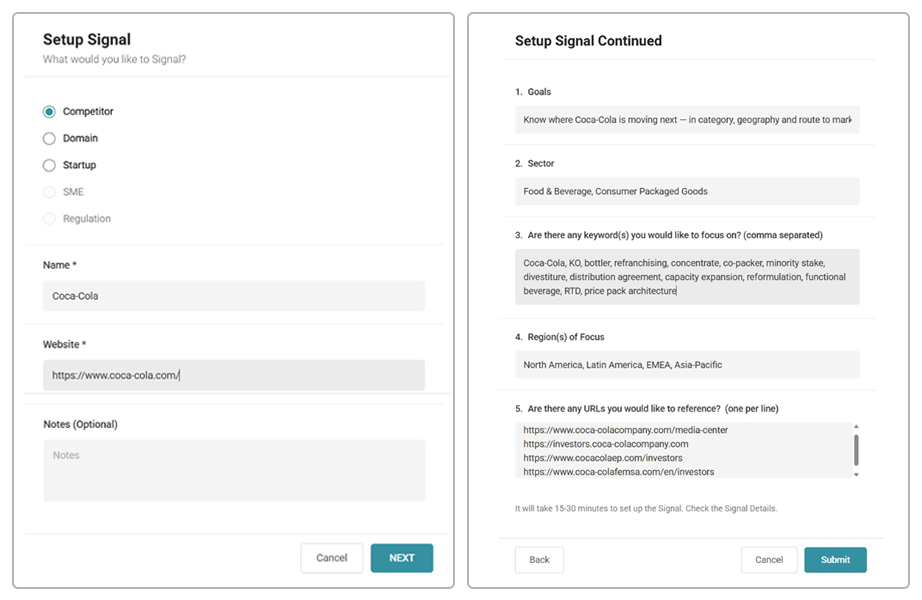
Your Scope Profile is already stored, so the platform knows who you are before you name anything. Click + and choose what you want to track: a Company — a competitor, a supplier, a customer, an acquisition target — or a Domain, meaning a technology, a field or an application rather than an organization. Then choose the lens. Intake consists of two steps, and the first asks for a name and a website. That is the whole requirement. The second step is optional, and it is where you narrow: your goals, your sector, keywords to focus on, regions that matter, and any URLs you want the signal to reference alongside its own sources. About 15 to 30 minutes later, the signal is live. No implementation project, no consultant.
Step 2
The Platform Watches
Your profile runs continuously against structured sources — patents, publications, clinical trials, grants, tech transfer, news, and conferences — across the source types relevant to that profile type. Where a profile needs reach beyond the library, monitoring can extend to the open web.
Step 3
The Signal Is Rated
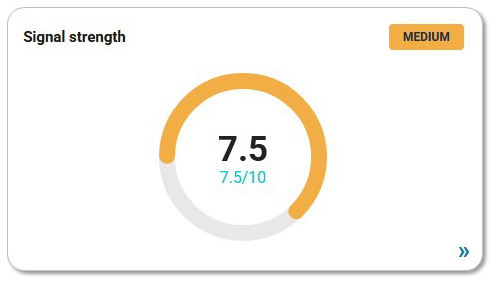
Not every match deserves your attention. Each signal is rated for confidence — how strong the underlying evidence actually is — and for time horizon, meaning when it plays out. The profile carries a Signal Strength gauge that reads those bands together — higher means stronger, more convergent evidence.
Step 4
You Get Notified
Signals appear on the profiles Activity tab, and notifications follow on the cadence you choose — weekly or monthly, or daily for company signals that need a closer watch. Regulatory signals arrive monthly. Any profile can also be run on demand when something happens, and you need an answer that afternoon. The signals don't require anyone logging in. And when a cycle produces nothing, that is reported too — no signal means no new activity, which is information in its own right.
Every Signal Arrives Already Rated. That is How You End up with Fewer of Them.
Rating is one way to reduce what reaches you. Counting properly is the other. An event is not a document: a single recall produces the manufacturer’s notice, a regulator’s database entry, a press release and three trade write-ups. Six documents, one occurrence, one signal — with all six records attached underneath it rather than arriving as six separate alerts.
The result is a number rather than a feed. A profile returns no more than eight signals in a cycle — few enough that a person reads all of them, each one carrying the reasoning that produced it. That is the whole design goal, and it is the opposite of what a monitoring tool usually does to your inbox.
Confidence: how much should you trust this?
Low
An early whisper. Thin evidence, often a single source, sometimes contradicted elsewhere. Worth logging. Not worth acting on by itself.
Medium
A real pattern with some corroboration, but gaps remain and you could still argue the other side. Most signals live here.
High
Converging evidence from multiple independent, credible sources, with a clear implication. Hard to argue against.
Every signal carries one of these three bands. A profile’s Signal Strength reads them together.
Time Horizon: when does this matter?
Immediate
0 to 3 months
Short-term
3 to 12 months
Long-term
1 to 3 years
The two scales are independent, and that is the entire point. A high-confidence, long-term signal is something to plan around. A low-confidence, immediate signal is something to verify this week. A single blended “priority score” collapses those into the same number and tells you nothing about what to do next.
What moves a signal up
Number of corroborating sources, and whether those sources are genuinely independent — three outlets running the same press release is one source, not three. Credibility of the source, where regulators and primary filings outweigh blogs and social posts. Whether findings converge or contradict. And how obvious the implication is: a pattern where “what this means” is clear rates higher than one that is real but ambiguous. Any unresolved gap keeps a signal in Medium.
Every Signal Is Checked Before You See It. So Are the Ones That Didn't Hold Up.
Before a report is delivered, every claim in it is re-checked against the primary record — the bill text, the docket, the enforcement action, the court filing, the published standard. Confidence ratings are revised where the evidence doesn’t support the original read, and the revisions are reported rather than quietly applied. Claims that could not be corroborated against a primary source are marked Inconclusive and left in place, so you can see them and weigh them yourself. Items that turn out to fall outside the reporting window are flagged as outside it rather than counted inside it.

The list of what we could not confirm ships with the report. That is the part you do not get from a system that is confident by default.
What a rating being argued down looks like
A May 2026 signal on the post-Chevron legal environment opened strong: three independent legal developments pointing the same direction, including an appellate decision asserting independent judicial review of an agency’s reading of its own statute. It shipped at Medium, near the bottom of the band. The category-specific cases had not yet produced a dispositive ruling, and the headline decision was stayed three days after it landed. The direction of travel was clear. The evidence for it was not yet durable. The rating says so.
Africa RTM control consolidating under Coca-Cola HBC as KO exits direct bottling ownership across the continent

The pending transfer of Coca-Cola Beverages Africa from KO/Gutsche to Coca-Cola HBC, combined with active refranchising still listed in KO’s Q1 and Q2 2026 IR materials, means a single independent bottler will soon control route-to-market decisions across 43 African and European markets.
Reasoning:
Three independent, high-credibility sources converge on the same structural event: KO’s own press release announcing the CCBA sale [6], Coca-Cola HBC’s 2025 Integrated Annual Report confirming the deal and its market scope [13], and KO’s Q1 and Q2 2026 IR overview presentations showing Africa refranchising still listed as ‘completed or in progress’ [11][12]. Together they establish that KO is systematically exiting direct bottling control in Africa and that HBC — not KO — will be the RTM counterpart across these markets once the deal closes. The HBC annual report adds the strategic framing: this creates the second-largest Coca-Cola bottling partner globally by volume. The pattern is decisive: distribution negotiation, co-packing access, service priorities, and category execution in Africa will be governed by HBC’s commercial logic, not KO’s.
Pattern:
KO and Gutsche Family Investments agreed to sell a controlling interest in CCBA to Coca-Cola HBC AG, targeted to close by end of 2026 [6][30]. Coca-Cola HBC’s 2025 Integrated Annual Report states the acquisition will create the second-largest Coca-Cola bottling partner globally by volume, spanning 43 markets across Africa and Europe, with completion expected by end of 2026 subject to approvals [13]. KO’s Q1 and Q2 2026 IR overview presentations list Africa (and India) under ‘Company-Owned Bottler Refranchising Completed or In Progress’ [11][12], confirming the process is active, not yet closed.
Implication:
Any business sharing distribution channels, co-packers, or cold-chain infrastructure with CCBA in African markets needs to reassess its counterpart relationship now — the entity making RTM and shelf decisions will change. HBC’s commercial priorities, pricing logic, and category emphasis differ from CCBA’s; terms and service levels negotiated under the current structure may not carry over. If we have African distribution or co-packing exposure, we should engage before the deal closes, not after.
Recommended Action:
Map all African market touchpoints — distribution agreements, co-packing arrangements, shared cold-chain — where CCBA is currently the Coca-Cola system counterpart, and initiate relationship outreach with Coca-Cola HBC’s BD and operations teams ahead of the anticipated end-2026 close.
Sources & What They Signal:
- KO press release: Sale of controlling interest in CCBA to Coca-Cola HBC AG – Confirms the transaction structure, timeline target, and that KO is exiting controlling ownership of its primary Africa bottler
- Coca-Cola HBC 2025 Integrated Annual Report – Confirms HBC’s framing of CCBA as materially expanding its African presence and creating the second-largest Coca-Cola bottling partner globally by volume across 43 markets
- KO Q2 2026 IR Overview Presentation – Confirms Africa refranchising is still listed as ‘completed or in progress’ in KO’s most recent investor materials, establishing the process is active
- KO Q1 2026 IR Overview Presentation – Corroborates Africa and India refranchising as ongoing in Q1 2026, consistent with Q2 materials
A Signal Is an Argument, Not an Alert.
Monitoring is the part everyone can do now. What decides whether anyone acts on it is whether the thing that arrives can be reasoned about. Every signal comes in six parts, in this order.
What the pattern indicates, written as a claim you can disagree with rather than a summary you can only accept.
Why it reads that way — including what weakens it, and what would have to be true for it to be wrong.
The specific events that produced the read, dated, so you can check the sequence yourself.
What it means for your portfolio, your suppliers, your filings, your customers. Written against your Scope Profile — not the same paragraph everyone else received.
The next thing to do, specific enough to hand to someone with a date on it.
Every source with a line on what it signals, not just a link to it. A citation tells you where something came from. The annotation tells you why it counted.
An alert tells you something happened. This tells you what to make of it, and gives you enough to argue with it.
Two Things to Track. The Lens Decides What Gets Watched.
Everything you can put a standing watch on is either a Company — a firm, whatever your relationship to it — or a Domain, meaning an area that isn’t an organization: a technology, a field, an application. What separates two signals on the same company is not the company. It’s the lens.
The lens is not a property of the thing you track. It’s a property of your relationship to it.
One large ingredient supplier, watched by three different clients. The first is buying from them and watching for supply risk, capacity investment, and quality events. The second competes with them and is watching pricing, packaging, and where they’re pulling resources away from. The third is evaluating them as an acquisition and is watching ownership structure, key departures and financial standing. Same company, same sources, three different signals — because the question is different in each case.
Company · Competitor
Product and roadmap, pricing and packaging, go-to-market motion, customer wins and losses, messaging, hiring and org structure, partnerships, capacity and operations, financial and legal standing. Read against your own trajectory, not in isolation — a competitor slowing down matters as much as one accelerating.
Company · Startup
For a company you’re tracking without having declared a single question yet — an early-stage entrant, or anyone whose trajectory matters more than any one question you could ask about them. Ranks by discontinuity rather than topical fit: a break in a pattern rather than a continuation of one. A founder departure or an unexpected down round outweighs any gradual trend, because at this stage one event can change everything about a company. It is the widest set in the product, and where a Startup signal keeps firing on the same dimension, that is the system telling you which specific lens to set up.
Domain · Commercial
Is it becoming real in the market? The useful gap is between proven and procurable. Plenty of things work and can’t yet be bought, and the reason why is usually visible a year before the market notices.
Domain · Research
Is the underlying work advancing? Not how far along it is — whether the evidence base is thickening, thinning, or reversing. Funding moves first, and publication moves last; the gap between them is the forecast.
Regulation · Regulatory
When a rule changes, the first call goes to whoever is the manufacturer, importer, or supplier of record. In many organizations, that is a role someone inherited without a compliance department standing behind it — real work, no title, no budget line. A Regulatory Profile puts a standing watch on the filings, proposed rules, guidance, and enforcement actions in your jurisdictions and product categories, and reports them against what you actually make and where you actually sell it. Every signal is time-stamped and tied to the record that produced it, so the decision is defensible afterward.
A regulatory watch covers nine dimensions: legislative and statutory activity, regulatory agency actions, enforcement and compliance signals, judicial and legal precedents, international and cross-border developments, standards and industry self-regulation, stakeholder and lobbying activity, political and administration signals, and media and public discourse. Rules rarely change in one place first. The bill, the docket, the enforcement pattern and the standards revision usually move before the rule does.
One Tells You What Changed. The Other Tells You Where the Rules Are Heading.
A regulatory watch produces three things, and you can take them separately: the Profile — the standing dossier for your category — plus the two documents below. A regulatory lead has three different problems, and no single document solves all three.They run on the same scope and the same profile. They read different sources and answer different questions.
The Report — what changed, and what do I have to do now?
Reads the official record directly: the Federal Register, enforcement and recall databases, import alerts, inspection and safety notices. Every change is dated and rated for impact, mapped to the regulation areas it touches, and cited to the primary source by number. It ends in an action list ordered by deadline. Built to hold up six months later, when somebody asks why a decision was made the way it was.
Signals — where are the rules heading, before they are rules?
Reads the layer above the rulebook: bills moving through committee, agency dockets and the volume of comment they attract, enforcement patterns, court reasoning, standards-body activity. Forecasts on a three-to-twelve-month horizon, each with a confidence rating, the pattern behind the call, what it implies for your own portfolio, and a recommended action.
Two Views. One Roster. The Signal Doesn't Start When the News Does.
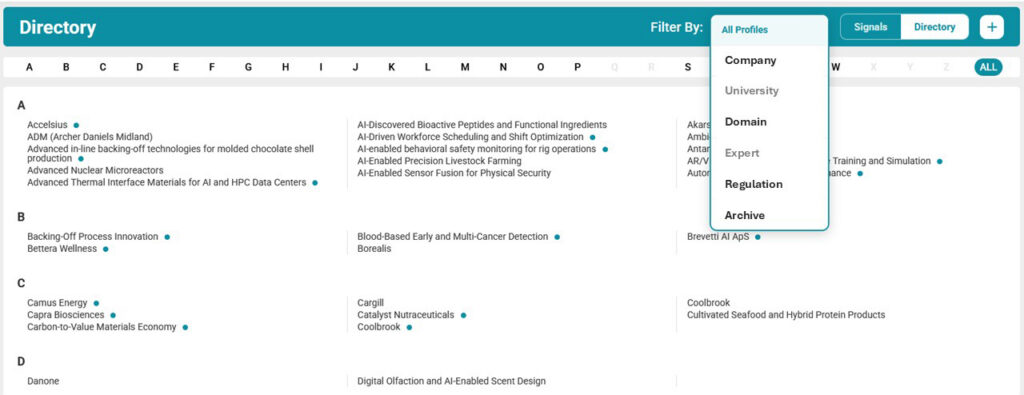
The Directory is every profile you have built. Signals is the subset you have put a watch on. A profile can exist without a signal — the dossier without the surveillance — which is why the two views answer two different questions: what do we know about, and what are we actually watching.
Directory
The roster. An A–Z list of every profile you have built — companies, domains, and regulatory subjects. Building a profile gives you the dossier: overview, products, records, contacts. Putting a watch on it is a separate decision. Profiles under an active watch are marked, and one click takes you to what has fired.
Signals
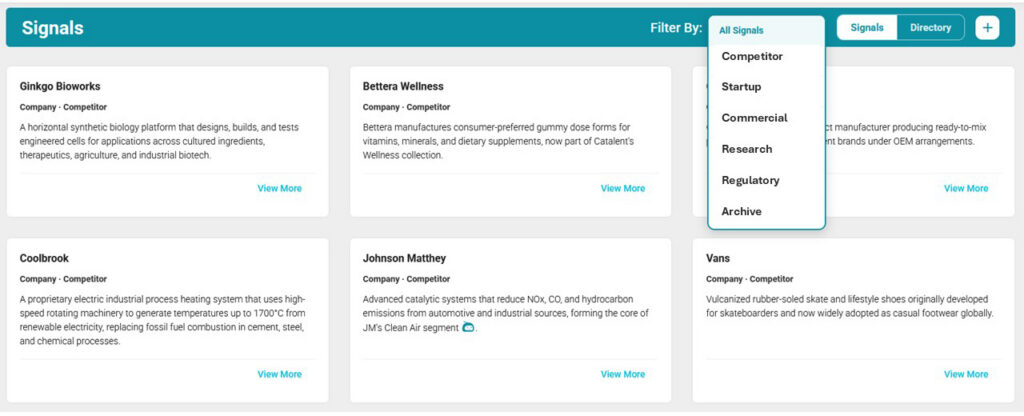
What you are watching. Every profile with a live signal in one view, each labeled with the lens you pointed at it — Company · Competitor, Company · Startup, Domain · Commercial. Open one, and you get its signals on the Activity tab, each carrying the reasoning behind it, alongside Profile, Records, Notes, Contacts and Attachments, with source-type tabs to inspect the specific publication, patent or news item underneath. Not just the alert — the record behind it.
Why the roster is the part that compounds. A signal list that existed before an event cannot be reconstructed after it. Not with a larger database, not with a better model, not at any price. Neither can the record of what was known and when. Every month a profile stays in your Directory, its history gets more valuable and harder for anyone else to replicate. A search starts from zero every time you run it. A roster doesn’t.
A profile can sit in the Directory for a year with no signal on it, and that is a legitimate state rather than a gap. The dossier is useful on its own. Putting a standing watch on it is a separate decision, and one you can make the day the question becomes live rather than the day you first heard the name.
Innovation Monitoring Software is Continuous
A Signal Is the Start, Not the End.
Score It Against Your Own Criteria
A signal’s rating tells you how strong the evidence is. Your goals, sector, keywords, and regions of focus — captured when you set the profile up — are what tell the platform whether it matters to you. The same competitor filing can be a footnote for one organization and a board item for another. Scoring against your stated strategy is what makes that distinction automatic instead of manual.
Route It Into AI Synthesis
Select the records behind a signal and route them into an AI synthesis session. Summarize the IP implications of a new patent cluster, assess the market relevance of a startup’s latest publication, or compare a competitor’s recent grant activity against their patent portfolio. Synthesis applies only to the records you select, grounded in the actual source data.
Route It Into the Innovation Pipeline
Signals that represent real intelligence — a partnership target, a licensing candidate, a competitive threat worth escalating — become an Idea, and then a project in the innovation pipeline. Stage-gate it, assign an owner, set a decision date, and track it through. The signal, its source records, and any synthesis output travel with it.
From Reactive to Continuous. What Innovation Monitoring Software Changes in Practice.
Innovation monitoring software changes the model from periodic search to continuous awareness — and that shift changes what teams are capable of noticing, and when. The value compounds over time. Here is what teams report changes first.
The Clock Starts Earlier
A profile that has been running since before an event reports it when the record lands — a patent on the day it publishes, a grant on the day it's awarded, a filing on the day it's filed. A search finds the same thing whenever someone next runs one. That difference isn't a claim about speed. It's a difference in when the clock starts, and it holds whether or not anyone on your team had a project open that week.
Fewer Things to Read
Rating is subtraction. Your team reads the high-confidence, immediate items and lets the long-dated ones accumulate context in the background. The platform handles surveillance; people spend their time on judgment.
A Dated Record of What You Knew and When
Every signal is time-stamped and tied to the source record that produced it. Over time that history becomes a defensible account of how a technology area, a competitor, or a regulatory position evolved — which is what you need on hand when someone asks why a decision was made the way it was.
What the Platform Is Actually Watching.
Innovation Monitoring draws on the 3DScout Library — structured records across patents, publications, clinical trials, grants, tech transfer agreements, trademarks, news, conferences, organizations, experts — and, for regulatory watches, the official record itself: the Federal Register, agency enforcement and recall databases, import alerts, inspection and safety notices, agency dockets and comment volume, court filings, and standards-body publications. The distinction that matters is not how large the library is. It is that a Competitor Profile is watching filings and registrations rather than a news feed, which is why a signal can appear when something is filed instead of when someone gets around to writing about it.

Tell Us What You Need Watched. We’ll Set the First One Up Live.